

Oceania Audio is the Authorised NZ Distributor
Flock Audio PATCH 64-Point Digitally Controlled Analog Patch Bay
Flock Audio PATCH 64-Point Digitally Controlled Analog Patch Bay
The Flock Audio Patch System is the world's most advanced digitally controlled 100% analog audio patch bay routing system.
Hardware
Beautiful on the outside and powerful under the hood, Patch hardware may appear simple but is packed with deep user functionality.
2 COMBO INPUTS & 2 XLR OUTPUTS
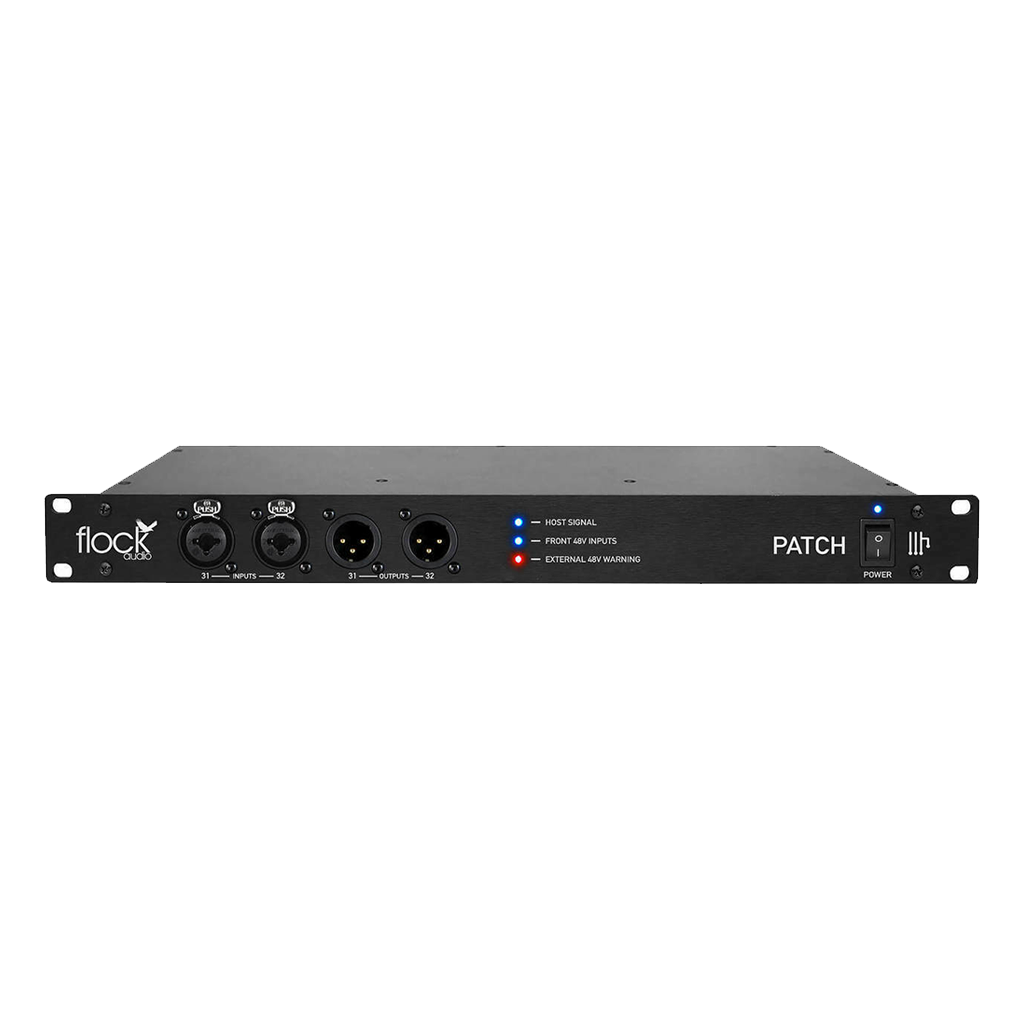
The PATCH System comes equipped with 4 Connectors housed in the front panel of the system. 2 - Inputs (XLR/TRS Combo jacks) and 2 - XLR Output jacks. These front panel connectors allow a user quickly & easily integrate outside audio equipment or instruments into your recording setup. The front panel connection points are optional use and can be activated/deactivated via using the Flock Audio PATCH APP. The 2 - Inputs (XLR/TRS) are also capable of powering 48 V microphones.
FRONT PANEL LED INDICATORS
Three colored LED Indicators assist the user with visual notifications including:
- Host Signal - This LED Illuminates solid Blue when the PATCH System Hardware is connected and communicating with the associated CPU
- 48 V Front Inputs - This LED Illuminates solid Blue when 48 V has been enabled to the Front Input Combo Jacks, notifying the user to not plug or unplug any audio equipment until the the 48 V is disabled
- External 48 V Warning - This LED Illuminates solid Red when any connected preamp has its 48 V actively on, because The PATCH System has its own on-board 48 V Power, its not necessary to activate 48 V on the connected preamp
USB-A To USB-B Control
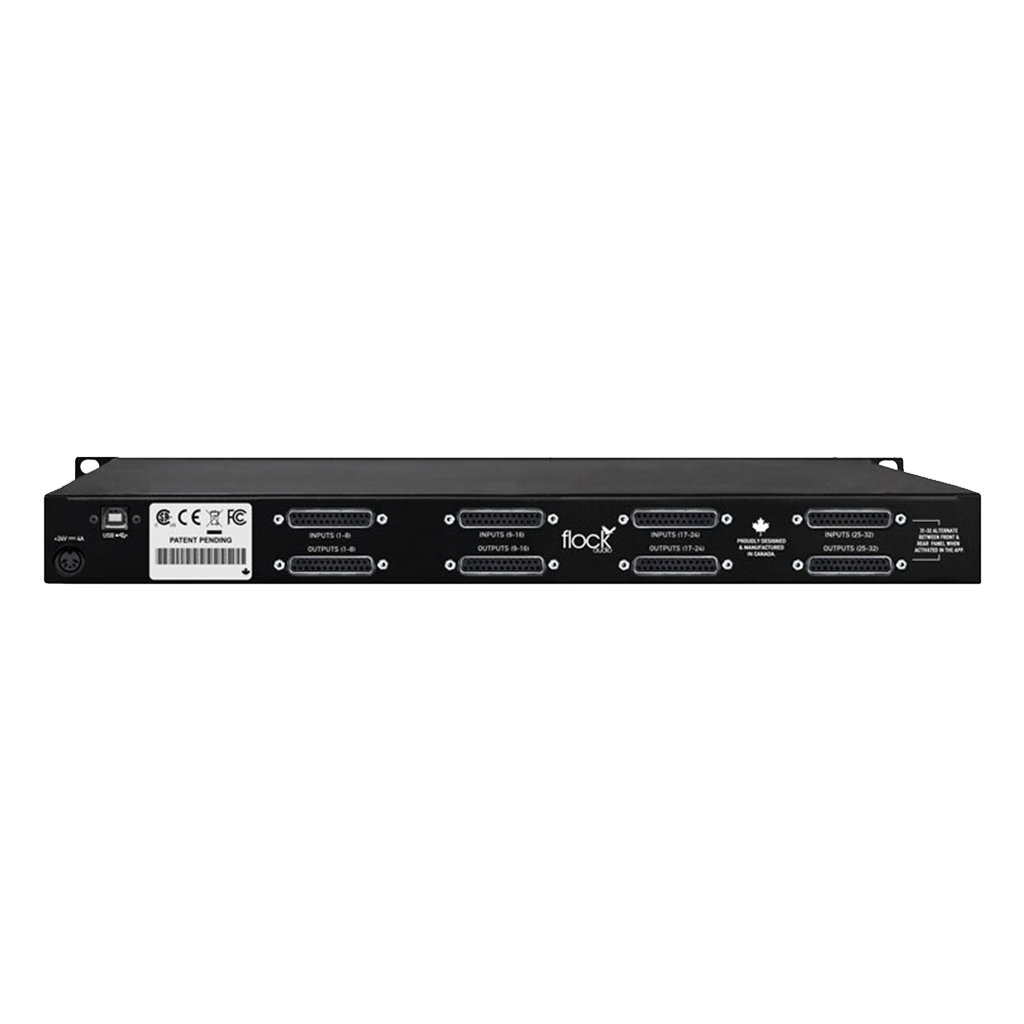
The PATCH System uses very little CPU processing power to send and receive commands from the hardware. Because of the minimal amount of processing required, the PATCH System works off a USB 2.0 and on-wards compatibility. The design was chosen for a low CPU usage so you can have your system processing working harder for your Interface & DAW rather then devoting a large amount of that processing to routing your analog audio equipment.
DB25 Rear Connections
DB-25's/D-Subs create a clean, simple and organized form of connections to the rear chassis of PATCH. Utilizing the standard Tascam Wiring Pinout schematic, any DB-25/D-Sub cable following this wiring format will work seamlessly with your system. For additional flexibility, Inputs & Outputs (31-32) will flip from the rear side of the chassis to the front when activated in the PATCH APP. This allows a user to quickly audition other outside audio equipment without disconnecting any already designated hardware connected to the PATCH System.
MULTI-PATCH UNIT EXPANSION
Connect Multiple PATCH Systems together for Expanded I/O Routing Capabilities. The PATCH System has no A/D or D/A conversions built in and with that comes no rules either...meaning connections for audio processing is transferred purely through an analog circuitry no digital. Users can connect multiple PATCH Systems together through their existing on-board I/O in many different configurations, whether you do equal Sends & Returns, maybe more sends than returns or even as little or as many connections between units as you require for your analog configurations.
Software
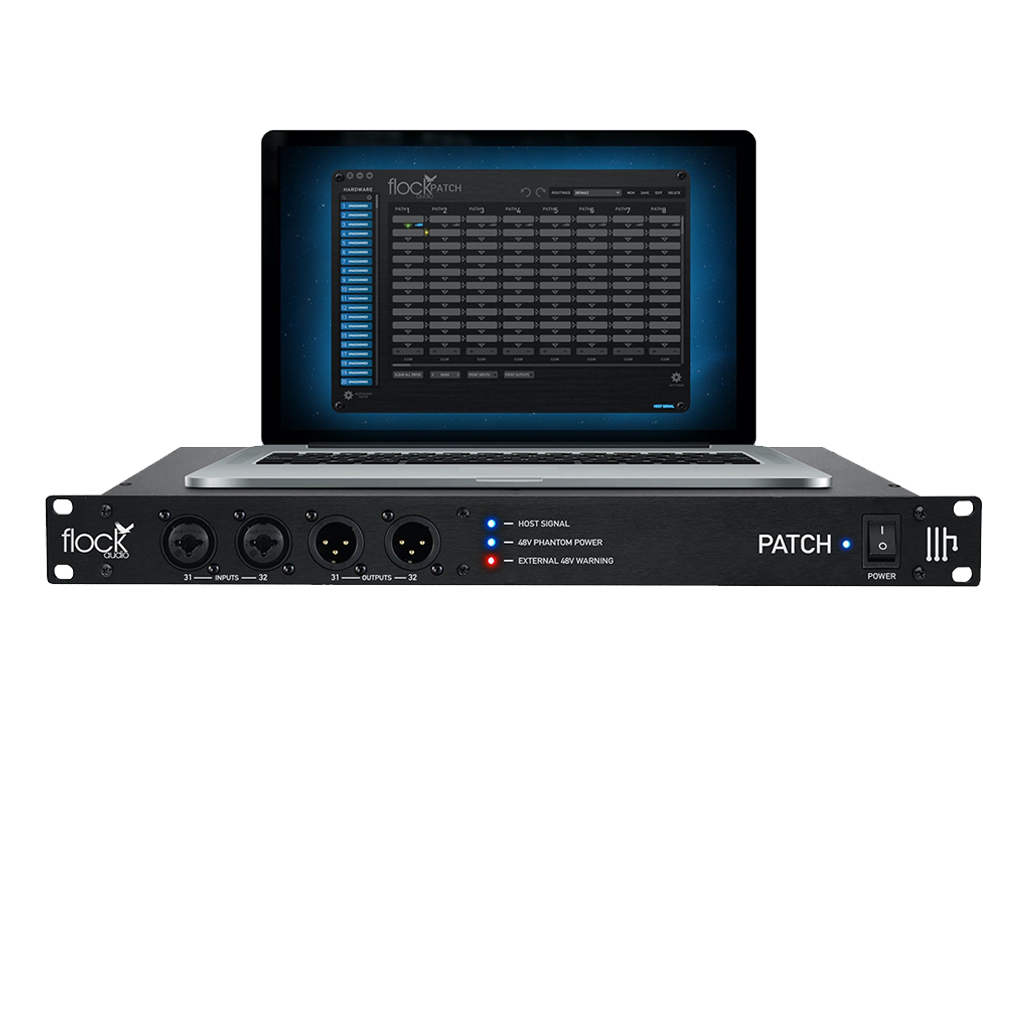
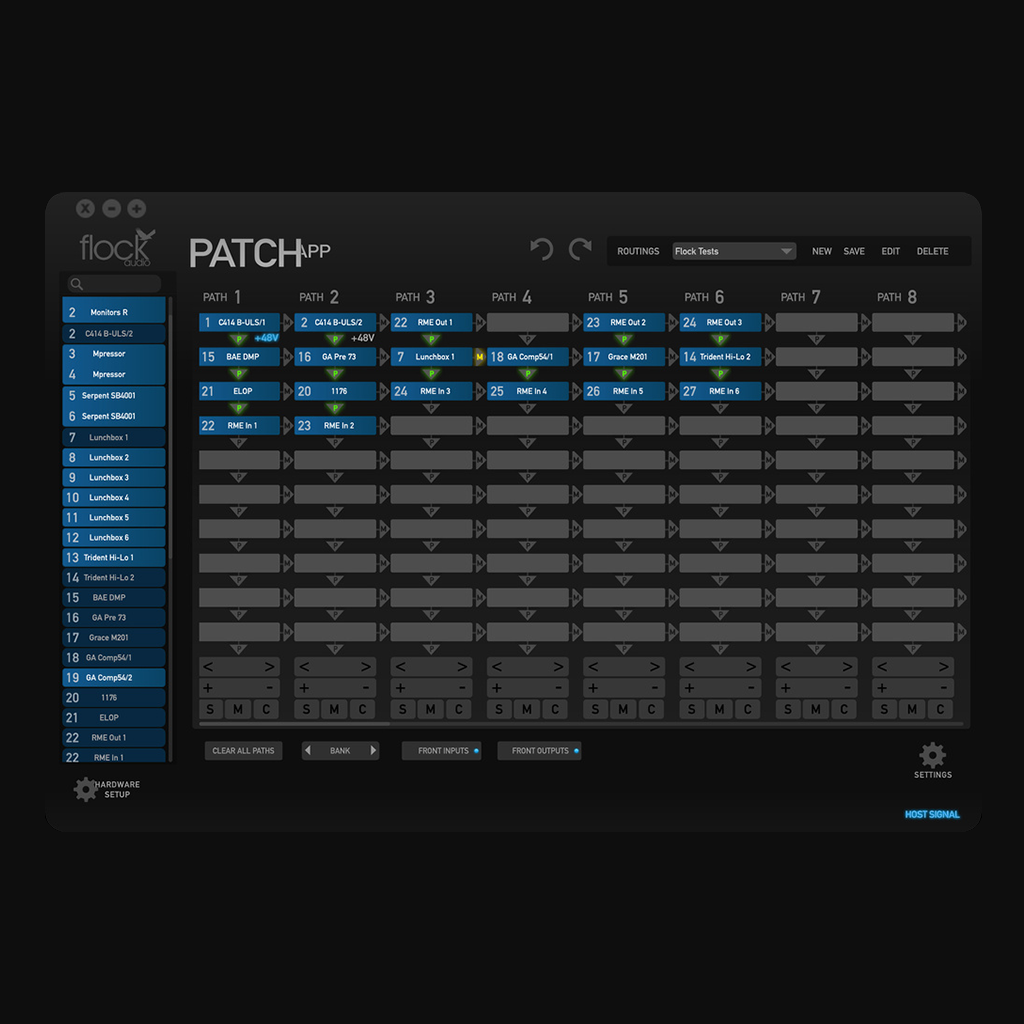
Designed with a familiar look & feel but all around original. The PATCH APP harnesses a powerful amount of flexibility in 4 user friendly sections illustrated below.
HARDWARE INDEX
Store all of your outboard hardware for easy drag & drop functionality in the "Hardware Index". The PATCH APP allows a user to customize and store all of their outboard audio equipment into an easy to use searchable Index.
STORED ROUTINGS MENU
Create, Store & Recall various routing configurations in seconds. The PATCH APP Routings Menu allow users to quickly Store active routings and recall them at a later date. The Routings Menu even has the ability to open the external storage folder right from the application so you can move Stored Routings to DAW session folders for better organization.
CONTROLS & TOGGLES
Quickly bank through 32 available Paths (8 per bank), Add additional digital rack spaces for more processing then 10 default spaces, clear single or all active paths for new routing opportunities and engage the front Inputs & Outputs right from the PATCH APP. This bottom section of the app allows the user to control important parameters of the PATCH System while on the fly.
ACTIVE ROUTINGS
The Active Routings section of the PATCH APP is where a user can setup and visually see their active routings. Using the simplicity of Drag & Drop functionality, a user can click and drag any piece of analog hardware from the Hardware Index into a Path to create their desired signal flow combination. Designed on the visual concept of most DAW layouts the PATCH APP Activate Routings section immediately becomes a familiar sight soon as user begins clicking around the in the app.
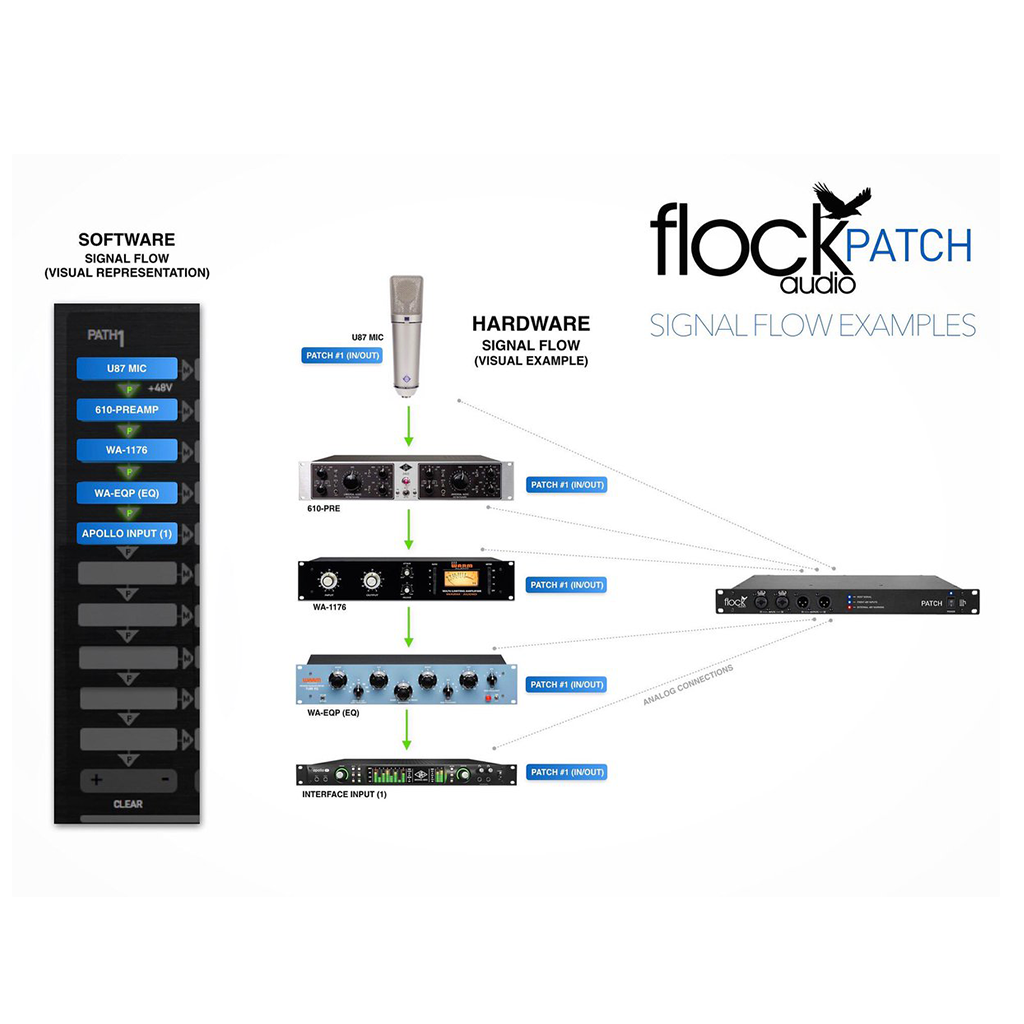
ITS ALL ABOUT SIGNAL FLOW
What are Paths? Paths are simply your signal flow when it comes to the PATCH System. All Paths or signal flows are arranged from top to bottom. For instance in the example next to this description, the green arrow indicates the default signal path as in this case Mic > Pre > Comp > EQ > Interface. You can easily Drag & Drop replacements over existing active Digital Racks to replace them with a different piece of analog hardware. You can take Paths a step even further and add advanced Multing capabilities...
MULTING WITH THE CLICK OF A MOUSE
Advanced Multing? Absolutely. The PATCH System users can simply click the directional arrow so it illuminates "Yellow" to the right side of any active path on the specific digital rack piece they prefer multing from. What about impedance load issues that come with traditional multing? Forget about it... Using PATCH's advanced multing capabilities any signal Multed off the original source is unaltered and has no load issues. Mult to your hearts content without any guilt of split signal quality loss.
POWER ON-BOARD
32 Channels of 48 V Phantom Power built right on board. Users can activate 48 V power to any of the available 32 Input channels for powering your favorite condenser microphones. Why 48 V on board? Well because through various testing phases with traditional patch bay options, majority of patch bays were either not able to carry phantom power at all or significantly under powering microphones. So Flock Audio decided to take it one step further and build 48 V right into the system. Now you can power your condenser microphones the way they were intended to be powered and get the most out of your other investments.
HARDWARE MENU
Manage all your new & existing analog hardware right from the Hardware Setup Menu. Remember templates, printing & cutting out labels? Forget about them forever...the PATCH APP allows you to quickly name & re-arrange your analog hardware while keeping it organized right in one simple menu. However, It doesn't stop there...see below some of the powerful setup features that makes a PATCH System unlike anything else in your rack.
ROUTING MULTIPLE UNITS WITH EASE
Routing and identifying multiple PATCH Systems for expanded I/O capabilities is easy. Simply setup designated Sends &/or Passes with your corresponding analog connections in the rear of the chassis between the PATCH Systems and move analog signals freely between units. Each PATCH System is identified by the colored outline you choose.
Features
• 64 Point Connections (32 Inputs / 32 Outputs)
• DB-25/D-SUB Tascam Standard Pinout Format Connectors
• 32 Independent Channels of 48V Phantom Power
• Front Panel - 2 Combo TRS/XLR Input & 2 XLR Output
• PATCH APP Routing Software (OSX & Windows) (iOS iPad Coming Soon)
• Create, Store & Recall Routings in Seconds
• Create Complex Multing Combinations w/ No Impedance Issues
• No AD/DA Conversion, 100% Transparent Analog Signal Path
• Patented Flock Audio Matrix Technology
• Multiple Unit Expansion with any PATCH Model (PATCH, LT & XT)
• External 5Pin 24VDC Power Supply w/ IEC Cable Included
• 10 Ft. - USB 2.0 (USB-A to USB-B) - Cable Included
• Unit Dimensions: 1U - 1.75”(H) x 19” (L) x 8” (D) - 15 lbs
Couldn't load pick-up availability
When will my order be dispatched?
Orders are dispatched Tuesday, Wednesday via Courierpost. You will be sent an email confirmation with tracking details once your order is on its way to you. If you have any questions about your order, please email nigel@oceania-audio.co.nz or use the contact form on this website.
How long will it take for my order to be delivered?
Orders are usually delivered the day after they are shipped. Rural orders may take 1-2 extra days.
Why is my order taking longer than expected?
Sometimes we have to order stock in from our suppliers if we don’t have it on hand. Where there are delays or when products are on backorder, this will always be indicated on the product page.
How much is shipping?
Shipping is free within New Zealand and dispatched with Courier Post.
Can I pick up my order?
Orders are shipped from our warehouse. If you would like to pick your order up, please arrange with us prior to placing your order. Email nigel@oceania-audio.co.nz or contact us using the contact form on this website.
What if my order was wrong?
If your order was incorrect or faulty in any way, please let us know and we will make sure you get what you ordered.
What is your refund policy?
You can find out more about our refund policy.
NZ Delivery
We like to keep things simple... Shipping is always FREE within New Zealand.
Our shipping days are Tuesdays and Wednesdays.
All packages are sent out of Auckland, New Zealand.
Please allow up to 7 working days for your package to arrive before contacting us. Although we strive to have them arrive in 1-3 working days with rural, public holidays, weekends, or unforeseen circumstances, this can take longer, depending on the shipping option, location and payment option you chose.
Once your order has been dispatched, you will receive a confirmation email with tracking details.
Please note: orders containing personalised or customised items may require additional processing time. Any extended timeframes will be clearly communicated at checkout or in your order confirmation.
Shipping Rates
Shipping is always FREE within New Zealand.
P.O. Boxes
We are currently unable to ship to P.O. Boxes. If a P.O. Box address is given by mistake we will contact you and this may cause a delay with the delivery of your package.
International Delivery
We don't currently ship outside of New Zealand, but if you aren't in New Zealand and see something you like, email sales@oceania-audio.co.nz and we will try to help you out.
Damaged, Lost or Missing Orders
If your order arrives damaged, incorrect, or is missing items, please contact us within 48 hours of delivery at sales@oceania-audio.co.nz with:
-
Your order number
-
Clear photos of the item and packaging
We will review each case individually and work towards a fair resolution in line with New Zealand Consumer Guarantees Act obligations.
Contact Us
If you have any questions about shipping, delivery, or your order, please contact:
sales@oceania-audio.co.nz
Questions? Spot a better price?
Call +64 9 845 7800 or Contact us
